[memb_totp_manage]
Description
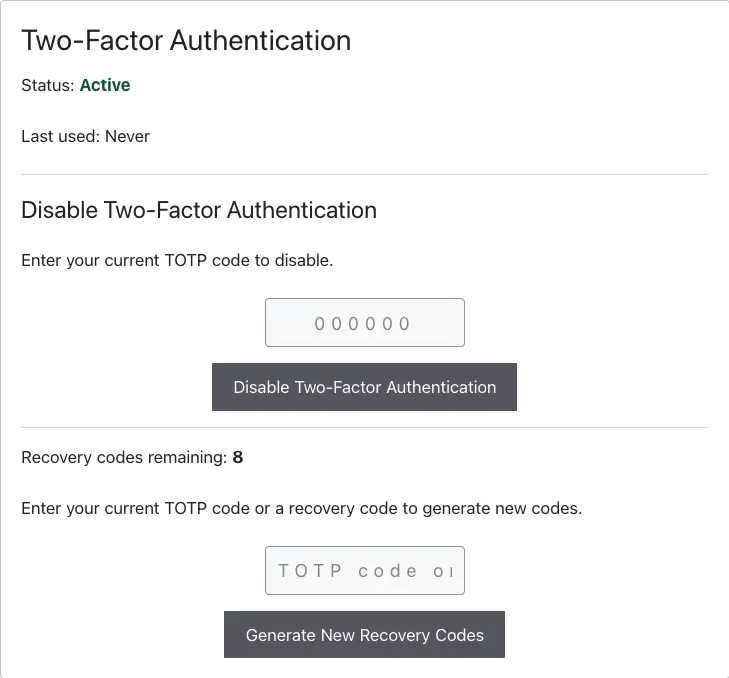
For verified users, renders the management panel showing:
- status (Active / Disabled) and last-used timestamp
- remaining recovery codes
- a disable action requiring the current TOTP code
- a regenerate recovery codes action requiring a TOTP or recovery code
Both actions verify a valid code before executing; failure re-renders the panel with an inline error. Freshly regenerated codes display once with a copy button.
Users enrolled but not yet verified see a link to the setup page
(setup_url) or a not-set-up notice. When an administrator has
disabled 2FA for the account, a disabled notice renders instead.
Logged-out users see nothing.
The HTML this shortcode renders comes from a template you can override in your theme. See Shortcode Templates.
Screens
The management panel for an enrolled member:
Shortcode Examples
[memb_totp_manage]With a setup link for unverified users:
[memb_totp_manage setup_url="/account/2fa-setup/"]Shortcode Parameters
setup_url
URL offered to verified-but-not-enrolled users. Default: ''.
Shortcode Attributes
| Attribute | Value |
|---|---|
| Conditional | No |
| Nestable | No |
| Accepts formatting | No |