Directory Privacy
A directory publishes information about people, which makes privacy the part to get right before launch. Three questions, three layers of control: who can view the directory (access rules), who appears in it (listing rules), and what each member wants hidden (member opt-outs). Each layer is independent; a public directory can list only consenting members, and a members-only directory can still let any listed member hide their card.
Who can view: access rules
Every directory carries its own access setting, the same protection model as any protected content: public, or restricted to members holding a specific tag. A user without access sees the access-denied output, whether they hit the directory's own permalink or a page embedding the shortcode. The Directories admin list has a protection filter to audit this at a glance: which directories are public, which are protected and with what tag.
Set it in the publish box or the Directory Settings metabox on the directory itself. It applies everywhere the directory renders; you can't embed a protected directory into an unprotected page and have it leak.
Who appears: listing rules
The roster (the list of members in the directory) is tag-driven. Each directory can name an include tag, and membership in the directory follows the tag: when a member's tags change, they join or leave the roster automatically. There is no manual roster to maintain and no stale entries after a cancellation, because the sync runs on tag changes.
For directories where appearing is opt-in (a public-facing "find a practitioner" listing, say), the roster still flows from tags; what changes is consent, which is the next layer.
What each member controls
Members get two opt-outs, managed from the Directories card on the Member Profile screen in the WordPress admin:
- Hide me from all member directories. The member disappears from every directory, grid, list, and map alike.
- Hide me from directory maps. The member still appears in grid and list views but not as a map marker. Useful when someone is fine being listed but doesn't want their location pinned.
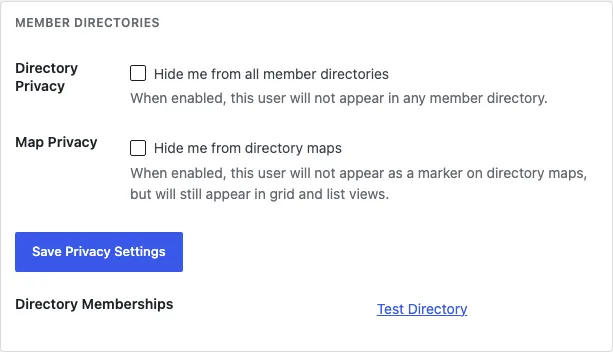
Below the toggles, the profile shows which directories the member currently belongs to, so support questions ("why am I not in the coaches list?") get answered in one glance: no tag, no roster entry.
For the member-facing side, [memb_my_directories] lists the directories a member belongs to on any page you place it.
What members see about each other
The fields on a member card are chosen per directory in the Directory Settings metabox, and only fields the member has filled are shown. Privacy extends below the card level too: the module tracks per-field visibility, so a member can share an email with the association but not the directory. If your forms collect sensitive fields, leave them off directory cards unless the directory's audience is tightly scoped.
Sync and deletion
Because rosters sync from tags and profile data renders live, a member's card reflects their current state without intervention. When a user account is deleted, the module cleans up their membership rows and privacy settings along with it; no ghost entries in the member table, no orphaned toggles.