Onboarding Funnel
Guide your members through their first steps on your site, using a setup funnel with pluggable gates that grows with your site.
The first login a member makes to your site is important. On most sites it is a dashboard of things to do, no order to do them in, and a support email waiting to happen. The member who never set up their profile, picked a password they can remember, or found the course they bought is the member who cancels next month, and the cancellation always looks mysterious in your numbers.
The Onboarding Funnel replaces that first-login free-for-all with a guided path. The member lands in a sandboxed area of your site, dedicated to getting them set up, and each step is a gate: complete it, and the next one unlocks. Set a password. Sign the agreement. Watch the getting-started video. The funnel walks them through it in order, and they can't wander off into the member area until the essentials are done.
The gates are pluggable, which is the part that grows with you. Start with the password step every member needs, and add gates later as your site gains features: a step for joining the community, a step for booking the welcome call, a step for the payment method on file. The funnel doesn't care; a gate is a gate, and the member's progress through it is tracked, so you can see exactly where people stall. A step that half your members abandon at is a step worth rewriting, and now you know which one it is.
To set yours up, follow the Setting Up the Onboarding Funnel guide.
Admin screens
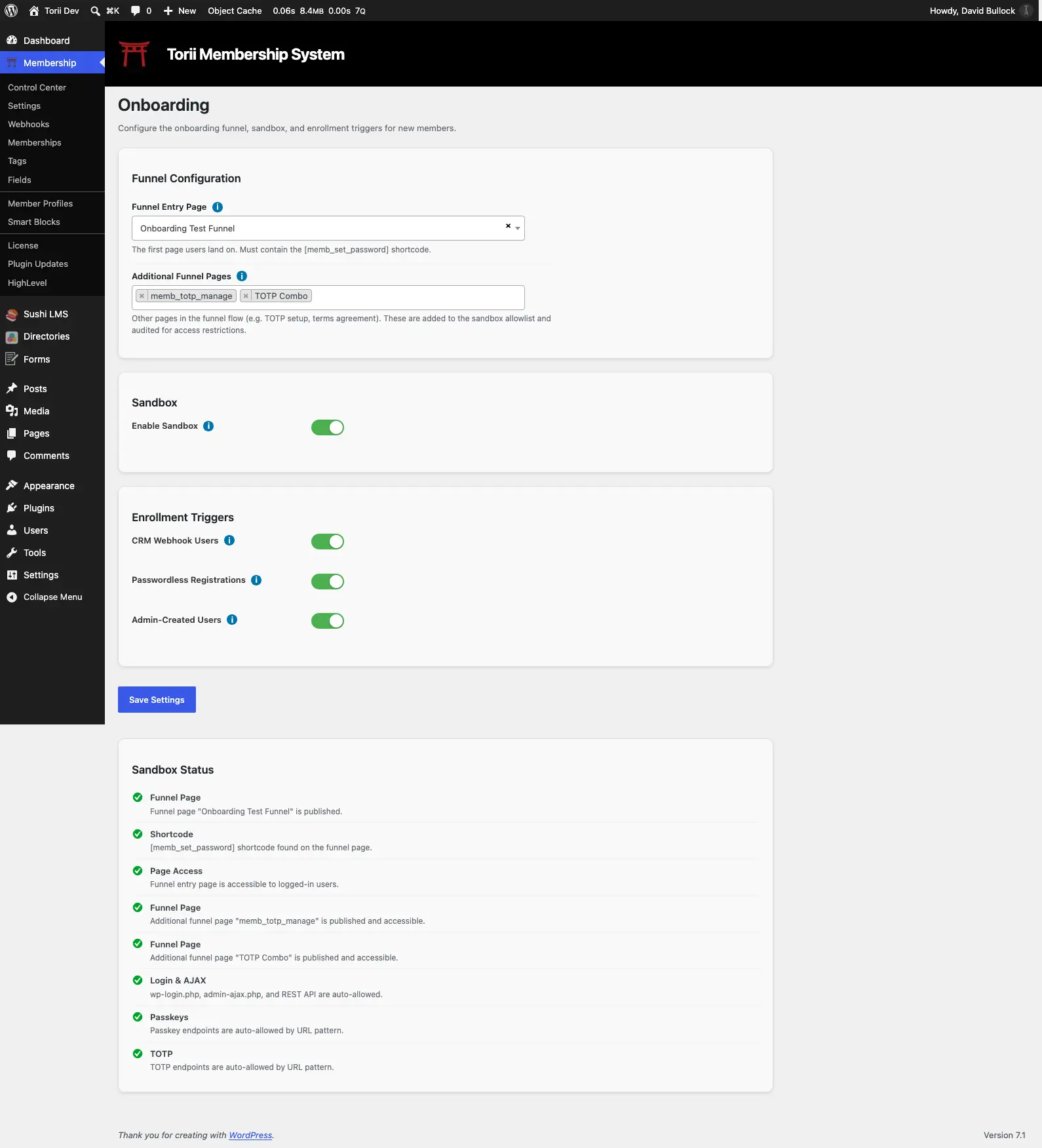
The module's settings live at Membership → Onboarding (enable the module first if it's off). Pick the funnel page, choose who gets enrolled, list any additional setup pages, and switch the sandbox on. The screen carries a live status checklist: when every check is green, the funnel is armed.
Articles
The three enrollment switches and the members each one captures, the skip rules, and the audit trail that records why a member entered the funnel.
The Onboarding SandboxHow the sandbox holds setup-needed members inside the funnel: what the bounce looks like, which pages and endpoints are allowed, when enforcement switches on, and how to let someone out early.
Onboarding ScenariosThree funnel builds from minimal to high-security: what each one asks of the member, which steps the module actually enforces, and the recipe for making a form submission count as a gate.
Shortcodes
| Shortcode | What it does |
|---|---|
| [memb_set_password] | Renders a password set form for logged-in users that doesn't require the current password. |