Reading the Page Views Log
Every row the Pageviews module writes ends up in one place: Membership → Page Views in the WordPress admin, or the Page Views card in the Control Center's Logs category. This page covers reading the log, finding things in it, and the two settings that govern the data itself: retention and IP recording.
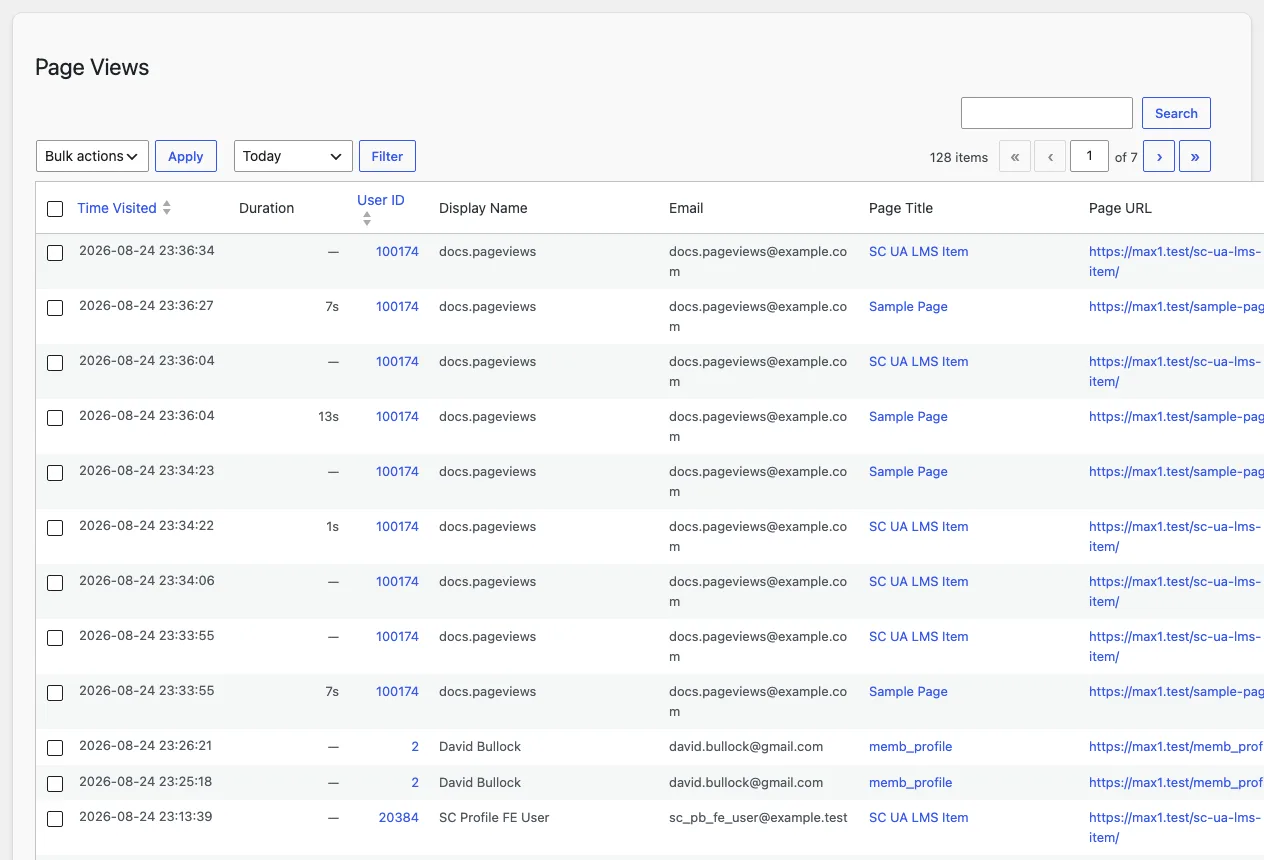
The columns
Each row is one page view:
- Member: username, display name, and email, linked to the user's profile.
- Page: the page title and its URL.
- Started at: when the member opened the page.
- Duration: how long the view lasted. What this means depends on the tracking mode: in Simple mode there is no duration; in With Duration it is the time between open and the browser's exit signal; in With Heartbeat it is the time to the last observed signal, heartbeat or exit. A missing duration is not an error; it means the end of the view was never observed.
- IP address: the address the member browsed from, when IP recording is on.
The default view hides a few columns (user ID, post ID, IP) to stay readable. Bring them back, or change how many rows show per page, under the Screen Options tab at the top right of the screen.
Finding things
The search box matches across everything you would search by: the member's login, name, and email, the page title, and the IP address. A number also matches the post ID, so searching a lesson's post ID finds every view of that lesson.
Above the table sits a date range filter: Today, Yesterday, Last 7 Days, Last 30 Days, This Month, Last Month, or All Time. Filter first, then search; the two combine. Most columns sort on click, so within a range you can order by member or by start time.
Rows can be selected and deleted in bulk. Deletion is removal from the log, not from anywhere else; use it to clear test data or a member's record on request.
How long records are kept
The Data Retention setting (Page View Settings screen, or the settings section under Membership → Settings) controls how long records live before a daily cleanup job deletes them. The default is 90 days: long enough to review a full quarter of member activity, short enough that the table stays small on a busy site.
Setting retention to 0 keeps records forever. That sounds generous until the table has a few million rows and the log screen slows down, so choose 0 only if you archive the data elsewhere.
Recording IP addresses
The Record IP Address setting, on by default, stores the member's IP with each view. The reason to keep it on is security review: the same IP appearing against two members' accounts is the classic signature of a shared login, and IP history is impossible to reconstruct after the fact.
The reason to turn it off is privacy. If your policy or local regulation treats IP addresses as personal data you should not retain, switch it off and the column simply stops filling.
Who appears in the log
Only members. Anonymous visitors are never tracked, and administrator and editor accounts are excluded, so working on your own site does not create rows. If a member seems missing, check the tracking mode page for what each mode does and does not record.