Building Courses
A course is a container: it holds modules, modules hold lessons, and quizzes attach anywhere in the tree. Access to all of it follows your membership tags, so building a course is a content task, not an access task. This page walks through the pieces and the builder screen that ties them together.
The four building blocks
Courses are the top level. A course carries the settings that apply to everything inside it: instructor, total duration, auto-enroll tags, certificate options, and prerequisite courses. Members enroll in a course, never in a module or lesson.
Modules group lessons inside a course. Think of them as chapters. A module belongs to exactly one course.
Lessons are the actual content a member reads, watches, or works through. Each lesson belongs to a module (or directly to the course), has its own duration, and carries its own completion rule: members mark it complete themselves, or it completes automatically the first time they view it.
Quizzes live in their own list and attach to a course, module, or lesson. Attaching a quiz to a module or course makes passing it a requirement for completing that module or course. The quiz engine is covered in Quizzes.
The Course Builder
Open a course and scroll to the Course Builder metabox. It shows the whole tree: modules as rows, lessons and quizzes nested underneath, in delivery order.
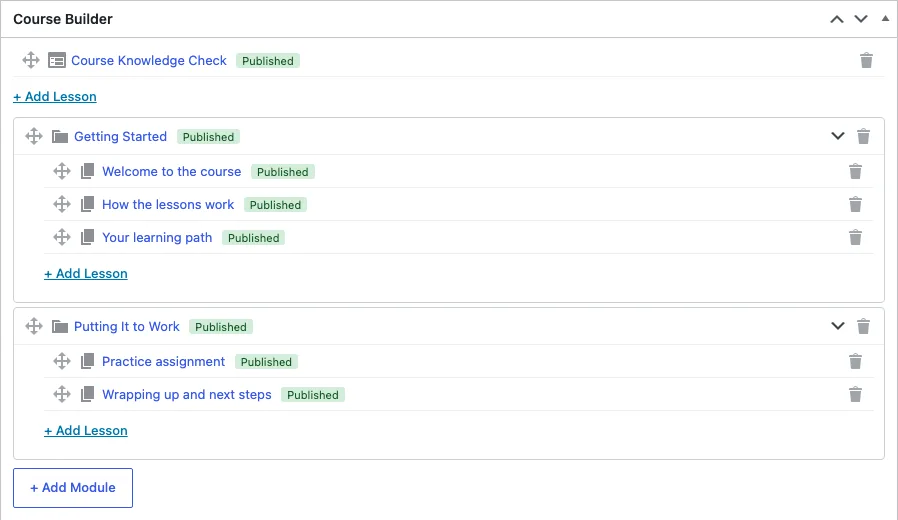
You can work two ways. The conventional way is to create each module and lesson from the admin menu, pick its parent on the edit screen, and set an order number. The builder is the faster way: click Add Module or Add Lesson and a draft item with a placeholder name appears in the tree immediately; open it from its edit link to give it a real title and content. Drag rows to reorder, and the order saves automatically. Remove an item from the tree and it moves to trash, so nothing is lost by a mis-drag. Items added through the builder start as drafts, so they stay invisible to members until you publish them.
Ordering matters more than it looks. Lesson order drives the prev/next navigation members see, the sequence enforcement described in Drip and prerequisites, and the outline shortcodes. Set the order once in the builder and every downstream feature follows it.
Durations
Every module and lesson has a duration in minutes. Course progress is duration-weighted: a 30-minute lesson counts as twice as much progress as a 15-minute one. Lessons you leave at zero count as 15 minutes in the math, so set durations on lessons where the number matters and skip them where it does not.
The course duration on the course settings box is the displayed total. It does not recompute from the lessons automatically, so after restructuring a course, update it by hand.
Course settings
The Course Settings metabox on a course holds the settings that apply course-wide:
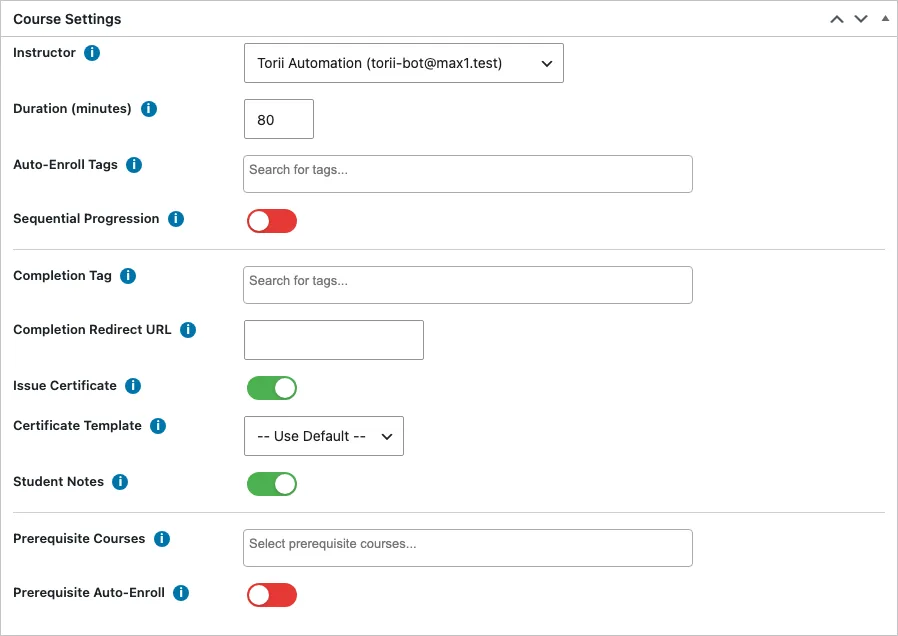
- Instructor: who teaches the course. Instructors see only their own courses in the admin lists and analytics.
- Auto-enroll tags: members who hold any of these tags get enrolled automatically, and members who lose all of them get unenrolled. Covered in Enrollment and access.
- Sequential progression: locks each lesson until the previous lesson in the course is complete.
- Completion tag: tags applied to the member when they finish the course.
- Completion redirect: where the member lands after finishing the last lesson.
- Issue certificate and template selection: covered in Certificates.
- Student notes: gives members a private notepad on the course and its lessons.
- Prerequisite courses: courses a member must finish before they can enroll in this one.
Duplicating a course
The Courses list has a Duplicate row action. It copies the course with all of its modules, lessons, and quizzes as a draft titled "(Copy)", including quiz questions. Duplicate is the fastest way to run the same course for two audiences: copy, edit the copy, and set different access rules. The action is limited to administrators.
Publishing
Courses, modules, lessons, and quizzes each have their own publish state. A lesson stays invisible to members until you publish it, even inside a published course, so you can build and release in stages. Draft content never appears in outlines or counts toward progress totals.
URLs follow the pattern you set in the module settings, defaulting to /courses/{course}/{module}/{lesson}/. Renaming a published item changes its URL and the old address is not redirected, so rename before you announce links.