Sushi LMS
A full LMS baked into the system. Courses, modules, quizzes, certificates, and analytics. No per-seat fees, no add-on trap.
Most membership sites that teach something end up bolting an LMS plugin onto their membership plugin, then a certificate plugin onto that, then a WooCommerce bridge to sell seats. Each piece bills separately, and access rules end up split between two or three plugins that disagree with each other at the worst moments. Sushi LMS exists because the membership system already knows who your members are and what they can see; the LMS should just use that.
In practice that means a course is content, and access follows your tags like any other content. Build a course out of modules and lessons, attach quizzes, and issue certificates on completion. Progress tracking is per member and per lesson, so you can show a progress bar, a resume button, or a full course outline with checkmarks using shortcodes. Members who lose access lose the course; members who regain it resume where they stopped.
Sushi LMS also plays host to the Cohorts module, which runs a group through a course on a shared schedule. And if you already run LearnDash, LearnPress, LifterLMS, or Sensei, the integrations bring the same tag-driven access to those platforms instead.
Admin screens
The module gets its own top-level menu with the content types and management screens under it. Courses, Modules, Lessons, Quizzes, and Templates are the content lists; Certificates lists every issued certificate; Enrollments and Students manage who is in what and how far they have gotten; Question Bank and Manual Grading handle quizzes; and Analytics charts the whole operation.
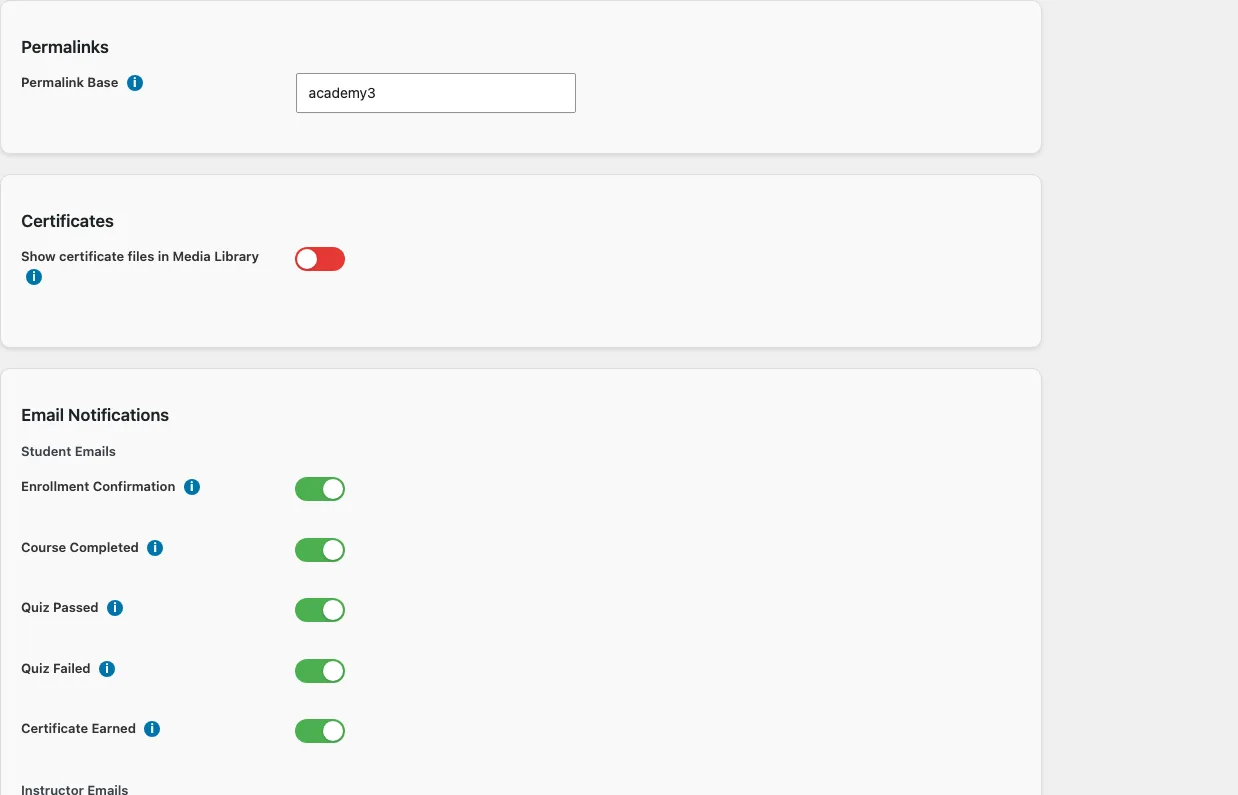
The Settings screen holds two things: the URL prefix for course pages, defaulting to courses, and the email notification toggles, grouped by recipient, that control which of the seven notification types are sent. Certificate files can also be surfaced in the Media Library if you manage media there.
Articles
Assemble a course from modules, lessons, and quizzes using the Course Builder, set durations and ordering, and publish.
CertificatesDesign certificate templates, let the module issue a certificate the moment a member finishes a course, and give every certificate a public verification page.
Drip and PrerequisitesControl when lessons unlock: drip schedules after enrollment or on a calendar date, sequential progression, and prerequisite courses and lessons.
Enrollment and AccessThe difference between having access to a course and being enrolled in it, the four ways members enroll, and how to manage enrollments from the admin.
Notifications and WebhooksThe seven email notifications, the toggles that control them, and the nine webhook events for wiring course activity into your CRM and automation.
Progress and AnalyticsHow progress is measured and weighted, what the Students and Analytics screens show, and the shortcodes that put progress in front of members.
QuizzesBuild quizzes from six question types, configure attempts and time limits, grade automatically or by hand, and let quiz results drive module and course completion.
The LMS REST APIThe torii-lms/v1 endpoints: public course listings and outlines for anyone, and authenticated progress, enrollment, and quiz endpoints for members and instructors.
Shortcodes
| Shortcode | What it does |
|---|---|
| [memb_lms_certificate] | Renders a link (or raw URL) to a member's course certificate. |
| [memb_lms_course_outline] | Renders the full course outline, modules and lessons with completion, access, and drip status. |
| [memb_lms_course_progress] | Renders a progress bar and completion indicator for the user's course progress. |
| [memb_lms_enrollment_button] | Renders an enroll / continue button for a course, adapting to the user's enrollment status. |
| [memb_lms_lesson_breadcrumb] | Renders a breadcrumb trail (course > module > lesson) for the current LMS post. |
| [memb_lms_lesson_nav] | Renders previous/next lesson navigation links. |
| [memb_lms_mark_complete] | |
| [memb_lms_my_courses] | Lists the current user's enrolled courses with progress, resume links, and certificates. |
| [memb_lms_resume] | Renders a resume button linking to the user's next incomplete lesson in a course. |
| [memb_lms_uncomplete] | |
| [memb_lms_verify_certificate] | Renders a public certificate verification form (and results) by hash or serial number. |